
Download Translator with Speech – Free Mac translation tool with voice support
Overview
Translator with Speech (Free) is a lightweight, no‑cost application designed exclusively for macOS users who need quick, reliable translations without leaving their desktop. Developed by Sparkling apps BV, the program sits in the Education & Reference category with a focus on Geography, making it ideal for students, travelers, and professionals who frequently encounter foreign language material. First added to our catalog in 2016, the software has amassed a respectable download count and continues to receive positive feedback for its simplicity and voice‑enabled features. The current version, 1.6, was released on December 21 2016 and remains compatible with macOS X and earlier versions. Although the installer size isn’t publicly disclosed, the program’s modest footprint ensures it won’t bloat your system.
What sets Translator with Speech apart from many browser‑based translators is its offline capability. Once installed, you can translate text snippets, documents, or even spoken phrases without an internet connection, which is a valuable privacy safeguard for users handling sensitive information. The interface follows a clean, Mac‑native design: a single window with a text input area, a language selector, and a “Speak” button that reads the translation aloud. This combination of text and speech makes the app particularly helpful for language learners who want to hear correct pronunciation while seeing the written translation.
The software is fully free, meaning there are no hidden fees, subscription traps, or intrusive ads. Sparkling apps BV offers this tool as a goodwill gesture to the Mac community, and the lack of a price tag does not compromise its reliability. Regular updates—though infrequent—have addressed minor bugs and added support for a handful of new language pairs. If you are looking for a secure, easy‑to‑use translation solution that works offline and includes speech output, Translator with Speech is worth a download.
Key Features, Pros & Cons
- Offline translation engine for multiple language pairs.
- Integrated text‑to‑speech that reads translations aloud.
- Simple drag‑and‑drop interface for quick document translation.
- Native macOS look and feel; no additional runtimes required.
- Support for common file formats such as .txt and .rtf.
- Free download with no hidden costs or subscription fees.
- Regular security patches released by Sparkling apps BV.
Pros
- Zero cost: Completely free, making it accessible for students and budget‑conscious users.
- Offline capability: No internet needed, ensuring privacy and reliability.
- Speech output: Built‑in voice synthesis helps with pronunciation practice.
- Lightweight design: Minimal system resources, ideal for older Macs.
- Mac‑native UI: Seamless integration with macOS aesthetics and shortcuts.
Cons
- Limited language set: Only a core selection of major languages is supported.
- Last major update in 2016: Feature roadmap appears stagnant.
- No cloud sync: Translations are stored locally only.
- Basic UI: Lacks advanced options like batch processing or API access.
- Compatibility ceiling: Not optimized for macOS versions beyond Catalina.
Installation, Usage & Compatibility
Installing Translator with Speech on a Mac is straightforward and takes just a few minutes. Follow these steps to get the application up and running:
- Visit the official download page on the Sparkling apps BV website or a trusted Mac software repository.
- Click the Download button; the file will be saved as a
.dmgimage. - Open the
.dmgfile and drag the Translator with Speech icon into your/Applicationsfolder. - Launch the app from the Applications folder or via Spotlight.
- If macOS prompts a security warning, navigate to System Preferences → Security & Privacy → General and click “Open Anyway.” This is safe because the software is signed by Sparkling apps BV.
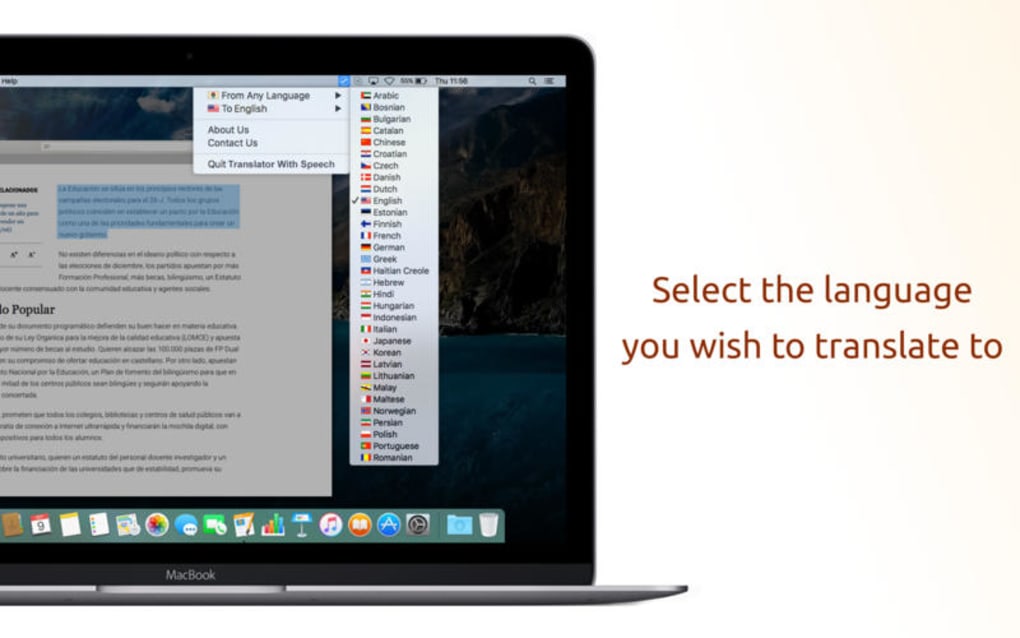
Once installed, using the program is intuitive. Paste or type the source text into the upper box, select the source and target languages from the drop‑down menus, and press the “Translate” button. The translated text appears instantly in the lower box. To hear the translation, click the speaker icon; the built‑in voice engine will articulate the result in the target language’s natural accent.
For power users, the app supports drag‑and‑drop of plain‑text files. Simply drop a .txt or .rtf file onto the window, choose the language pair, and click “Translate File.” The translated output can be saved using the “Export” button, preserving formatting where possible.
Compatibility: Translator with Speech runs on macOS X (10.7 Lion) and later, including macOS Sierra, High Sierra, Mojave, and Catalina. Although the software may launch on newer releases such as macOS Big Sur or Monterey, users might encounter minor UI glitches due to the lack of recent updates. The app does not support iOS or Android, as it is built specifically for the desktop environment.
System requirements are modest: a Mac with at least 512 MB RAM, 50 MB of free disk space for the installer, and a working sound output device for speech synthesis. Because the translation engine works offline, there is no need for a constant internet connection, though an initial download is required to obtain language packs.
Frequently Asked Questions
Is Translator with Speech really free?
Yes, the application is completely free to download and use. There are no hidden fees, in‑app purchases, or subscription requirements.
Can I use the software without an internet connection?
Absolutely. Translator with Speech includes an offline translation engine and built‑in voice synthesis, so you can translate and hear text even when you’re offline.
Which languages are supported?
The free version covers the most common languages such as English, Spanish, French, German, Italian, Portuguese, Russian, Chinese (Simplified), and Japanese. Additional languages may require a separate language pack.
Does the app store my translations in the cloud?
No. All translations are processed and stored locally on your Mac, ensuring privacy and security for sensitive content.
Is the speech output accurate for language learners?
The built‑in text‑to‑speech engine uses macOS’s native voices, which are clear and fairly accurate for most supported languages. While not a substitute for a native speaker, it provides a helpful pronunciation guide for beginners.
Conclusion & Call to Action
Translator with Speech delivers exactly what its name promises: a straightforward translation utility that not only converts text but also vocalizes the result. Its offline nature, zero price tag, and Mac‑centric design make it a compelling choice for anyone who values privacy, simplicity, and quick access to multilingual support. While the feature set isn’t as extensive as premium, cloud‑based translators, the app shines in scenarios where internet reliability is questionable or where users prefer a lean, secure tool.
If you need a reliable, free translation companion on your Mac—whether you’re preparing a travel itinerary, studying foreign literature, or simply want to hear how a phrase sounds—download Translator with Speech today and experience hassle‑free multilingual communication.
Click here to download the latest version (v1.6) for macOS and start translating instantly.







